Thursday, March 10, 2016

Survey Q & A - Outlets for Laptops

Question:
Where can I plug in my laptop?

Answer:
We took a look around the building, moved around tables in the collaborative study room, added one surge protector strip outside of the epicenter, and another one in the Law Library area. All the surge protectors and the regular outlets should accommodate at least 36 laptops.

Look for signs on the walls where there is a outlet.


(Image source: Microsoft Office Clip Art.)

Here is also a map. The bigger red diamonds are the surge protectors each with 6 plug-in slots.

Friday, February 5, 2016

Quiet Computer Area

Comment received 2/4/2016
Can you keep people quiet in the main computer area? 

Response:
First of all, thank you for your comment! To provide both quiet and collaborative study areas for our students, we have a color coded Library Zones system (See details). The main computer area is in the Green Zone where normal talking and collaborations are allowed. 

If you need to use a computer quietly, here are a few options:
 1. Feel free to walk in the Epicenter computer lab whenever there isn’t a class even if the room is dark. It is in the Yellow Zone, so let us know if others were not quiet. 

2. Use your laptop or check out a laptop to use in the Red Silent Zone in the back. 

3. Request a study room for individual study, although you will be asked to give up the room if a group needs it.

Do you have any good ideas? How about noise canceling ear muffs for checkout at the front desk?

Monday, March 9, 2015

Book Call Number Index and Shelf Map

The following index and map can help you find books in the CBC Library Main Collection. First, you want to search for books using the library Catalog and write down the call number. Also notice that the "Location" of the book should be "Main Collection" before using the map.

Main Collection Call Number Ranges and Shelf Numbers Index

From To Shelf #
AC1 ---- B3312 ---------- Shelf 1
B3313 ---- BF692 ---------- Shelf 2
BF697 ---- BL80 ---------- Shelf 3
BL80.2 ---- BM530 ---------- Shelf 4
BM534 ---- BS455 ---------- Shelf 5
BS465 ---- BT382 ---------- Shelf 6
BT431 ---- CB245 ---------- Shelf 7
CB251 ---- D273 ---------- Shelf 8
D285 ---- D805 ---------- Shelf 9
D810 ---- DA570 ---------- Shelf 10
DA576 ---- DF82 ---------- Shelf 11
DF89 ---- DK289 ---------- Shelf 12
DK290 ---- DS127.8 ---------- Shelf 13
DS127.9 ---- DS711 ---------- Shelf 14
DS712 ---- DT107.8 ---------- Shelf 15
DT107.8 ---- E98  ---------- Shelf 16
E98 ---- E169 ---------- Shelf 17
E171 ---- E183.8 ---------- Shelf 18
E183.8 ---- E188 ---------- Shelf 19
E188 ---- E451 ---------- Shelf 20
E453 ---- E756 ---------- Shelf 21
E757 ---- E879 ---------- Shelf 22
E880 ---- F596 ---------- Shelf 23
F597 ---- F1230 ---------- Shelf 24
F1231 ---- GF41 ---------- Shelf 25
GF49 ---- GT3412 ---------- Shelf 26
GT3520 ---- HB539 ---------- Shelf 27
HB615 ---- HC5915 ---------- Shelf 28
HD29 ---- HD6079 ---------- Shelf 29
HD6095 ---- HF5351 ---------- Shelf 30
HF5381 ---- HM19 ---------- Shelf 31
HM22 ---- HN59 ---------- Shelf 32
HN59 ---- HQ753 ---------- Shelf 33
HQ755 ---- HQ1421 ---------- Shelf 34
HQ1423 ---- HV5825 ---------- Shelf 35
HV5831 ---- HX635 ---------- Shelf 36
HX653 ---- JK511 ---------- Shelf 37
JK513 ---- JX1251 ---------- Shelf 38
JX1255 ---- KF4527 ---------- Shelf 39
KF4541 ---- LB880 ---------- Shelf 40
LB885 ---- LB2331 ---------- Shelf 41

LB2331 ---- LC5215 ---------- Shelf 42
LC5219 ---- ML390 ---------- Shelf 43
ML394 ---- ML3790 ---------- Shelf 44
ML3795 ---- N5390 ---------- Shelf 45
N5604 ---- N7399 ---------- Shelf 46
N7406 ---- NB198 ---------- Shelf 47
NB205 ---- ND237 ---------- Shelf 48
ND237 ---- NE546 ---------- Shelf 49
NE628 ---- P120 ---------- Shelf 50
P121 ---- PE1689 ---------- Shelf 51
PE1700 ---- PN56 ---------- Shelf 52
PN56 ---- PN1993 ---------- Shelf 53
PN1993 ---- PN3491 ---------- Shelf 54
PN3499 ---- PN6121 ---------- Shelf 55
PN6121 ---- PQ6353 ---------- Shelf 56
PQ6400 ---- PR852 ---------- Shelf 57
PR861 ---- PR2729 ---------- Shelf 58
PR2751 ---- PR3597 ---------- Shelf 59
PR3620 ---- PR4801 ---------- Shelf 60
PR4803 ---- PR6005 ---------- Shelf 61
PR6005 ---- PR6056 ---------- Shelf 62
PR6057 ---- PS303 ---------- Shelf 63
PS305 ---- PS648 ---------- Shelf 64
PS648 ---- PS1888 ---------- Shelf 65
PS1892 ---- PS3503 ---------- Shelf 66
PS3503 ---- PS3511 ---------- Shelf 67
PS3511 ---- PS3525 ---------- Shelf 68
PS3525 ---- PS3545 ---------- Shelf 69
PS3545 ---- PS3557 ---------- Shelf 70
PS3558 ---- PS3572 ---------- Shelf 71
PS3573 ---- QA10 ---------- Shelf 72
QA11 ---- QC23 ---------- Shelf 73
QC23 ---- QE156 ---------- Shelf 74
QE175 ---- QH541 ---------- Shelf 75
QH541 ---- QP38 ---------- Shelf 76
QP45 ---- RA643 ---------- Shelf 77
RA644 ---- RZ400 ---------- Shelf 78
S21 ---- TH2031 ---------- Shelf 79
TH2301 ---- TL788 ---------- Shelf 80
TL789 ---- TX795 ---------- Shelf 81
TX809 ----     Z ---------- Shelf 82


Mobile: Scan the code to carry this page with you to the book shelves! Needed: Your smart phone with internet and a free QR code reader. Or visit http://tinyurl.com/cbc-shelves in your phone's browser.


(QR-Code Generator at http://qrcode.kaywa.com/ was used.)

y.y.

Thursday, January 1, 2015

Visitor Parking - Library Building, Pasco

Click to view in Google MapsCommunity members and other visitors to CBC may park in any of the white striped parking spots on campus. Yellow and green striped parking spots are reserved for those with CBC parking permits. Those assigned to the visitor parking lot in front of the A building should have a visitor permit.

The main CBC Library is in the L building in the center of the Pasco campus; there is no immediately adjacent parking. The library entrance is on the South side of the building. The East A, G, P, West H and North H parking lots are all quite convenient (view on this map). Get directions.

Monday, May 12, 2014

Ferguson's Career Guidance Center

We now have a subscription to Ferguson’s Career Guidance Center, which provides detailed job and industry profiles, advice on job-hunting and career skills, résumé writing advice and samples, short videos on a wide variety of related topics, college search and job finder tools, and more.

Additional resources are outlined in our other blog: http://cbclibtopic.blogspot.com/2012/09/careeroccupation-resources.html

Friday, April 25, 2014

Graphing Calculator

We have added a TI-84 Graphing Calculator to the equipment available for use in the library.  This was one of the most requested items on our recent technology survey.  It may now be requested at the Circulation Desk; as with our other items (computer and regular headphones, projector, webcam) you'll need to leave your student ID as collateral while using it in the library.  If you need to check out a graphing calculator please visit the Math department office and they will assist you.

Reading For Fun

We had comments both on our recent library survey and in our comment box that the library needed more and better recreational reading titles.  The college responded by giving us funds to purchase brand new books (normally this collection is build on donations).  We have a survey posted in Canvas we hope you'll take to help us spend the money!  If you'd like to see what is coming in here is a link to items added to Recreational Reading in the last 90 days.

Wednesday, September 25, 2013

Jazz Online - Naxos

Naxos has created a new online library for Jazz Music and has extended a complimentary subscription to us (since we currently subscribe to their classical music library):
Naxos Music Library Jazz
Only have two users may access this database at a time, so it is important to   Log-Out   using the link at the top.  It will last through 9/30/2014.

NOTE: We have a paid subscription to Jazz Music Library which allows unlimited usage; you may want to try that first/instead.

Friday, September 20, 2013

Scientific American


logo

CBC Library now has online access to Scientific American.

Access the latest issue today!


Since 1845 Scientific American has been providing cutting-edge content in science, technology, policy and business worldwide. As one of the most recognized, respected and widely read monthly magazines, Scientific American bridges the gap between the research community and those who can put discoveries to work. Every issue identifies and delivers the latest developments, along with business-critical R and D, across a broad range of fields including:
Health Environment
Space Society and Policy
Technology Energy
Biology General sciences
Mind and Brain

Scientific American also offers:

Scientific American Mind Included with your site license subscription to Scientific American, Scientific American Mind publishes substantive information on the science of what makes humans human. Expert writers consider and define such topics as how we make choices, whether multitasking saves time, how memory works and the latest findings in depression and stress.

Friday, May 3, 2013

Lit Fest Display, 2013


Books by current and past LitFest authors are now on display in the CBC Library. Don't miss the Three Days in May event at the Richland Public Library, May 21-23!

Thursday, March 21, 2013

Printing in the Library (Pasco Campus)

New:  Printing from most of the computers in the Library.
  • Students must log into the computers with SID and PIN;
  • Students must choose desired printer every time, the default printer differs on each computer;
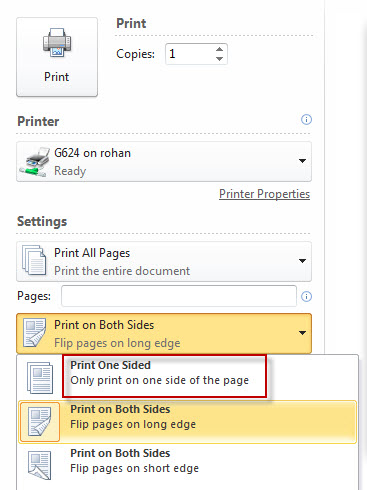
  • When printing, students can choose NetPrint printers (designated with NP) DIRECTLY and single-sided printing if desired. See image below. There is No Need to login to the NetPrint web interface and upload files. 
  • 75 page limit - split larger files into multiple print jobs.

More Information about cash printing (G624, G699, and G530; Pay cash at Circulation) :
  • Students will NOT be charged for citation, abstract, library catalog, or KIOSK printing.

  • Students will be charged for printing of full-text articles, email, assignments, web pages, etc. in the main library on the Pasco campus.

  • G624 and G699 are black & white printers ($.05 per page, defaulted to "Print on Both Sides")

  • G530 is the color printer ($.25 per page, defaulted to print Single-sided)

  • You can pick up your printings at the Circulation Desk. Let us know the number of the computer (e.g. Index 8, epicenter 16, etc.) that you printed from.

To print PowerPoint slides 2-6 slides on one side of a page, print as "Handouts".


The college encourages double-sided printing to save paper and most instructors are aware of that. However, if for some reason, you would like to print single-sided, you can change the default.


Using the NetPrint Web Interface (from your laptop or any non-library computer with an internet connection)
(G841 black & white, G866 color; every currently registered student gets $12 "free" credit for printing.)
  • NetPrint Web Interface Login
  • NetPrint Information page
  • $12 "free" credit per quarter
  • The black & white printer defaults to double-sided printing and it cannot be changed using the NetPrint web interface
  • Limited file types accepted using the NetPrint web interface. A lot of files can be converted to XPS files, which works with the NetPrint web interface. If you need help, ask a reference librarian.
  • NetPrint Demo (Update: All student NetAccounts are automatically activated now. Please skip the first part of the video.)

y.y.

Tuesday, January 15, 2013

Finding Required Textbooks for Classes

After you have registered for your classes, you might want to find out what books are needed. Instructors send the information to the CBC bookstore before the quarter starts. You can search for the textbooks at the CBC bookstore website. You may rent if available. Renting can be cheaper but you have to mail it back after the rental period. You may also use the library reserve copy if available, which is also usually in-library use only. See detailed information about your options below.

I. Steps to find out required textbooks by course
1. Go to http://www.cbcbookstore.com/
2. Scroll down and click on the blue "textbooks" button above "Store Info"
3. Check the checkbox and click "Continue to Textbook Ordering" (You don’t have to order online.)
4. Click on the quarter that you want to find out about. (e.g. "Winter 2013")
5. Select the department. e.g. "ENGL&", click on it to select the specific class
6. Classes will appear on the right side window that says "Your Schedule".
7. Click on the black "Find Books" button
8. You should see the list of textbooks, note the edition and ISBN.

II. If the book is too expensive,  you can rent textbooks if available.
Go to http://cbc.rentsbooks.com
You can search for the book by ISBN, Title, etc. Note that not all textbooks are available for renting. Renting can be cheaper but you have to mail it back after the rental period. Amazon.com sometimes also offer rental options.

III. At the library, we have a course reserves (library use only) which includes some textbooks. We don't have textbooks for all classes on reserve. You should also try searching by the book's title in the catalog to see if there is another copy in a different location. Ask for "Reserve Circ" items at the Circulation desk. Ask a librarian if you need help with the search.

IV. Resource center provides short-time no-interest book loans for students. According to their director, “there is no interest and no fee and no low income requirement, but students will have to show financial ability to pay back the loan by the end of the quarter. This would be helpful for some students who are working but could benefit from paying the tuition in three installments over the summer. Students who have financial aid already should not apply for the loan unless for some reason their aid payment did not arrive on time and they need help."

V. Finally, you may want to confirm with your instructor that the book you are ordering is the right one. Sometimes your instructors might even allow you to use an older edition, which could be much cheaper. Some instructors might also put an extra copy of the textbook on reserve at the library if they know that the bookstore has run out of copies. To find contact information of your instructor, go to the CBC Staff Directory.

y.y.

Thursday, January 3, 2013

BBC Shakespeare Online Videos

The library has added streaming video productions of several of Shakespeare's greatest plays.  Originally produced by the BBC for television these feature brilliant actors including Anthony Andrews, Claire Bloom, Brian Glover, Anthony Hopkins, Bob Hoskins, Derek Jacobi,  Helen Mirren, and Patrick Stewart.  Requires Adobe Flash player.

Monday, December 3, 2012

New Gale Virtual Reference title - Encyclopedia of Drug Policy

Encyclopedia of Drug Policy. Mark A. R. Kleiman and James E. Hawdon, eds. Sage, 2011. 2 vols. in print. Offers broad, concise and readable coverage of United States drug policy, along with some coverage of the drug policies of select other nations. From the introduction: "entries can be grouped into six broad categories: drugs, laws and policies, organizations and individuals, control strategies and their underlying theories, drugs in select countries, and drugs and other social problems." Other titles in the Gale Virtual Reference library look at drug issues from health, addiction, social problems, law enforcement, historical and scientific views.

Wednesday, November 14, 2012

New Gale Virtual Reference Books!

Encyclopedia of Gender in Media. This "does a remarkable job of providing an orientation to two vast topics--media (film, television, radio, music, reading material, and new media, represented by online sources), and gender (female, male, lesbian, gay, transsexual)--in slightly over 170 entries." [CHOICE, Nov. 2012] While this includes many of the topics one might expect - advertising, the Beauty Myth, television, stereotypes - it also includes blogs, MMORPGs, Reality TV Makeover shows, Facebook, Video Games, and YouTube.


Encyclopedia of Modern China. Ed. by David Pong. Gale, 2009. Over 900 articles, 2000 pages, nearly 500 authors, hundreds of illustrations including many full-color photographs and 53 primary source documents cover China "... from 1800 to the present; topics range from the daily life of common folks to the ever-changing structure of the banking system that is part of the engine of China’s recent transformation." Rated 'outstanding' by the RUSA and CHOICE and honorable mention for the 2010 Dartmouth prize (the winner was the Encyclopedia of Human Rights, also available from CBC Library).

Friday, November 9, 2012

Double Sided Brochure

This how-to is designed for Word 2007 but all of the instructions work for Word 2010: http://www.microsoft.com/education/en-us/teachers/how-to/Pages/theme-related-brochure.aspx

Once you have created your brochure you may print it in color in the library.  Double-sided or duplex printing in color is not available from NetPrint - you must use the printer behind the Circulation desk:

File > Print
1) Select printer G835
2) Choose to Print on Both Sides Flip pages on short edge


Friday, November 2, 2012

EBSCOhost Mobile

Automatic Mobile Access (for any mobile device)

EBSCOhost Mobile’s new smart technology auto-detects when an user is visiting from a mobile device and auto-directs the user to the same database in a clean, frameless search environment that is much easier to work with on the small screen. (Off campus, you will need to log in with your MyCBC ID and PIN. )

EBSCOhost App (for iPhone, iPod Touch, and Android Phones)

If you have an iPhone or iPod Touch or an Android Phone - there's an EBSCOhost app for that. The advantage of using the app as opposed to using the mobile site is that you can get an authentication key and don't need to log in (when off campus) every time with the CBC Library Database password for 9 month. The tradeoff is that you will have to spend the time to download the app first and get the authentication key following the steps below: 

Step 1: Log in to the CBC EbscoHost website using either the mobile site with your mobile device or regular EBSCOhost with a desktop computer

Step 2:  Click on the link at the bottom of the screen that says 'EBSCOhost iPhone and Android Application'

Step 3: Enter your email address (this must be accessible from your iPhone/Android Phone) to send yourself an email with a link to the app store and an authentication key.

Step 4: From your device, access the email account used in the previous step.

Step 5:  Download the app (If you haven’t already).

Step 6:  Tap the “authentication key” link in your email, which will authorize your device for use with CBC’s EbscoHost databases for 9 months before you'll need to acquire a new key.

They have a help page if you have any difficulties.

Tuesday, September 18, 2012

Library Database Remote Access

Two ways to find the CBC library database page:
  1. Direct link:  http://columbiabasin.edu/library/resources, or 
  2. From the CBC home page, hover over "Current Students", look under "Academic Resources" to find the link "library". Click on the link to go to the library homepage, then click on "All Resources (A-Z List)” to see our database list.

Login to library databases:
  1. Click on one of the databases such as EBSCOhost, CQ Researcher, etc.
  2. If you are off-campus, you will see the following page. Click on "I am a CBC student" or "I am a CBC faculty/staff member".   (Note: This is new starting September 2012.)
  3. Log in with your student or employee ID/PIN. The same ones you use to log into MyCBC.
  4. Start searching the database!
For more information,  see our troubleshooting page at
 http://www.columbiabasin.edu/index.aspx?page=681


Contacts:
Research Help: 509-542-4890
Library Information: 509-542-4887
Renewals/Fines:509-542-4458

y.y.

Tuesday, July 31, 2012

New CBC Homepage

At midnight on July 31st, 2012 Columbia Basin College switched to a redesigned website.  Our library homepage and resources page have new addresses; in case it is more convenient here are direct links to our most popular databases:

Books

  • CBC Library Catalog - provides information about our collection of books, periodicals, audio-visual materials, and other resources. 
  • Ebrary - over 26,800 ebook titles

Articles

  • EBSCOhost Academic Search Premier - more than 4,600 full-text periodicals, including nearly 3,500 peer-reviewed scholarly journals.
  • ProQuest - more than 2,000 full-text periodicals, including several major national and Washington state newspapers, magazines, and nearly 1,000 scholarly journals.

Reference

  • Oxford Reference Online - more than 130 general and specialized dictionaries, encyclopedias, and other references covering most academic disciplines and seven foreign languages.
  • Gale Virtual Reference - over 70 encyclopedias and handbooks in business, law, history and the social sciences, and medicine.

Should you have any difficulty locating needed library information on the redesigned site please contact CBC Library Reference at 509-542-4890 or library@columbiabasin.edu.