Showing posts with label services. Show all posts

Thursday, March 21, 2013

Printing in the Library (Pasco Campus)

New:  Printing from most of the computers in the Library.
  • Students must log into the computers with SID and PIN;
  • Students must choose desired printer every time, the default printer differs on each computer;
  • When printing, students can choose NetPrint printers (designated with NP) DIRECTLY and single-sided printing if desired. See image below. There is No Need to login to the NetPrint web interface and upload files. 
  • 75 page limit - split larger files into multiple print jobs.

More Information about cash printing (G624, G699, and G530; Pay cash at Circulation) :
  • Students will NOT be charged for citation, abstract, library catalog, or KIOSK printing.

  • Students will be charged for printing of full-text articles, email, assignments, web pages, etc. in the main library on the Pasco campus.

  • G624 and G699 are black & white printers ($.05 per page, defaulted to "Print on Both Sides")

  • G530 is the color printer ($.25 per page, defaulted to print Single-sided)

  • You can pick up your printings at the Circulation Desk. Let us know the number of the computer (e.g. Index 8, epicenter 16, etc.) that you printed from.

To print PowerPoint slides 2-6 slides on one side of a page, print as "Handouts".


The college encourages double-sided printing to save paper and most instructors are aware of that. However, if for some reason, you would like to print single-sided, you can change the default.
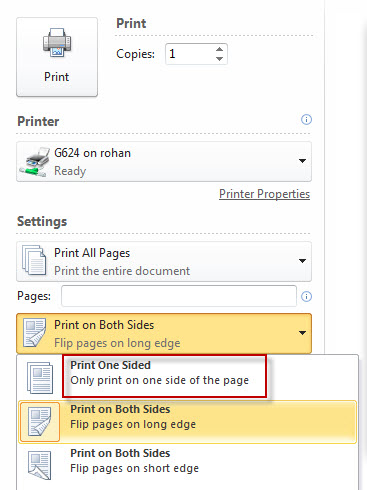

Using the NetPrint Web Interface (from your laptop or any non-library computer with an internet connection)
(G841 black & white, G866 color; every currently registered student gets $12 "free" credit for printing.)
  • NetPrint Web Interface Login
  • NetPrint Information page
  • $12 "free" credit per quarter
  • The black & white printer defaults to double-sided printing and it cannot be changed using the NetPrint web interface
  • Limited file types accepted using the NetPrint web interface. A lot of files can be converted to XPS files, which works with the NetPrint web interface. If you need help, ask a reference librarian.
  • NetPrint Demo (Update: All student NetAccounts are automatically activated now. Please skip the first part of the video.)

y.y.

Monday, May 17, 2010

Summer Hours for Richland Library

The Richland library will have the following reduced hours for Summer 2010.

Closed: June 19-27

June 28-August 27
Monday-Thursday: 8am-1pm
Friday-Sunday: Closed
Closed July 5

Closed: August 28-Sept 19

Friday, March 19, 2010

Available at Circulation

We have just added two Iogear 56-in-1 Memory Card Reader/Writers to the equipment available at the Circulation Desk. Plug them in to any of our lab computers' USB ports, wait a minute for it to install itself, and you will be able to read/write to compact flash, SD, Micro SD, Mini SD, and many other types of memory card. These may be checked out for use in the library. Note that our Epicenter computers have this capability built in.

We also have headphones (computer and AV), calculators, and book/paper holders available for library use from the Circulation desk - and pen drives that can be checked out for 1 week.

Thursday, March 18, 2010

Tutor Center Hours - Winter 2010 Finals Week

MATH TUTOR & WRITING CENTER HOURS
March 22-24, 2010
Mon -- 8:00am-2:50pm
Tues -- 8:00am-8:00pm
Wed -- 8:00am-12noon

Note that CBC Students have access to eTutoring as well. This service allows you to submit drafts of papers or questions to tutors in:
Accounting
Anatomy & Physiology
Biology
Chemistry
Math (Developmental through Calculus)
Medical Coding
MS Office 2007
Spanish
Statistics
Web Development (xHTML, CSS, and Adobe Dreamweaver)
Writing

Live chat-based tutoring in Accounting, Calculus, Math, and Statistics is also available.

Friday, March 12, 2010

Qwidgets Everywhere!

We have deployed the Qwidget version of our "Ask a Librarian" service in our reference webpage, our Topic of the Week blog, the Library Research sections of WebCT and Angel, and on the results page of every EBSCOhost search. These use OCLC's QuestionPoint software to provide you live 24/7 web-based text chat with librarians from Washington state and beyond. Qwidgets are great for quick questions, but the full window versions, either frames or no frames, would be better for more involved research help.

Of course, we still hope that you will come in to our libraries and let our reference librarians assist you, live and in person. But if you're at home struggling with your research paper late at night when the library is closed, isn't it nice to know you can still Ask A Librarian?

Sunday, November 1, 2009

Proctored Exams

The library has posted the policy used for proctored exams, slightly revised at the 11/10/09 Library Committee meeting. It includes links to the other departments offering proctoring on campus: the Assessment Center, the Resource Center Disability Services, and the Open Computer Lab. (Updated Feb. 7 2011 y.y.)

In addition to CBC, those seeking proctoring services may wish to contact the Mid-Columbia Libraries' Kennewick (Main) and Pasco branches, Charter College, Sylvan Learning Center, and WSU-Tri-Cities.

Monday, September 21, 2009

MLA Style Guide Updated

Our MLA guide page for CBC Library Databases has been updated to reflect the 7th edition MLA Handbook (2009). For those required to use the 6th edition style we have retained the old page. If you compare them you will notice a number of important differences:
  • All citations include the medium of publication.
    • Print publication citations end with the word 'Print.'
    • Online publication citations end with 'Web.' followed by the date of access.

  • Citations no longer include the name of the library that subscribes to the database.
  • When citing online publications the URL should be included "only when the reader probably cannot locate the source without it or when your instructor requires it" (MLA 7th, 5.6).
The citation generation features of our databases vary greatly in the quality and style of MLA citations they are producing. Some have not adopted MLA 7th edition at all, others have made odd changes. We recommend that you follow the guidance of your instructor, the Writing Center, the MLA Handbook and this guide page (in that order), and use automatic citation generators with caution.

Thursday, August 20, 2009

Sending Fax

Option 1:

Students can send faxes at the CBC Bookstore. It is $1.00 for first page, 25¢ for each additional page. Ask at the bookstore cash register.

CBC Bookstore
http://www.cbcbookstore.com/
509-547-0511 ext. 2293
-----------------------------------
Option 2:

If email is an option, students can email the document(s) using library computers. If no electronic copy is available, students can scan the document(s) using our library color scanner and then email.

------------------------------------
Option 3:

There are numerous free online fax services.

However, you should be extremely careful about sending your personal information over the internet using either email or some online services in order to avoid identity theft.

Friday, May 29, 2009

Tuition and Book Loans

Peggy Buchmiller, Director of the Resource Center announced that the Center "has tuition and book loans for Summer Quarter available for students who qualify. We will begin accepting Summer tuition loan applications on Monday, June 1st. Summer book loan applications will be accepted beginning Wednesday, June 24th after book buy back is completed. Applications are available in the Resource Center Office in the HUB."

She also explained that there is no interest and no fee and no low income requirement, but students will have to show financial ability to pay back the loan by the end of the quarter. This would be helpful for some students who are working but could benefit from paying the tuition in three installments over the summer. Students who have financial aid already should not apply for the loan unless for some reason their aid payment did not arrive on time and they need help.

Thursday, December 18, 2008

Resource Center Funds

The Resource Center at CBC has funds available for tuition and book loans, and for childcare and travel for Winter Quarter. Please refer students to our office in the HUB to complete an application. They can also call us at 542-5525 for more information.

Peggy Buchmiller
Director, Resource Center
Columbia Basin College

Note regarding textbooks: The library only has the textbooks if the instructor or department places them on reserve with us. If instructors have (or can get) an extra copy of their textbook they may bring them to Circulation, or send them via campus mail along with the class reserve form to Library Circulation, MS-L3.

Some textbooks are available for students to use in the Tutor Center.

Thursday, December 11, 2008

Learning Needs Assessments

The Resource Center provides “Learning Needs Assessments” to students who are struggling academically. These assessments will look at the reasons behind the students academic difficulties and refer them to appropriate on and off campus resources. Please refer students to the Resource Center in the HUB to schedule an appointment for this assessment. They can schedule this appointment by calling the Resource Center at 542-4412.

Peggy Buchmiller
Director, Resource Center
Columbia Basin College
http://columbiabasin.edu/home/index.asp?page=433

Wednesday, November 5, 2008

Monday, October 6, 2008

Assisting Spanish Speakers

Here is the Spanish for ‘I am sorry, I don’t speak Spanish. One moment while I transfer you to the operator.’

Lo siento, pero no hablo espanol. Un momento mientras que le transfiero al operador.

Explaining to a Spanish speaker that they have been misdirected or are otherwise misinformed after determining that they wish to buy, not borrow, books.

Lo siento mucho, ---- I am very sorry (standard politeness)
pero esta es una biblioteca. ---- but this is a library.
Para comprar libros, ---- to purchase books
usted quiere la libreria, ---- you want the bookstore
que esta en el segundo piso del HUB. ---- which is on the second level of the HUB.
El HUB esta detras de la biblioteca. ---- The HUB is behind the library (gestures)
Tengo un mapa. ---- I have a map (offering it, with further gestures)