Showing posts with label video. Show all posts

Thursday, March 21, 2013

Printing in the Library (Pasco Campus)

New:  Printing from most of the computers in the Library.
  • Students must log into the computers with SID and PIN;
  • Students must choose desired printer every time, the default printer differs on each computer;
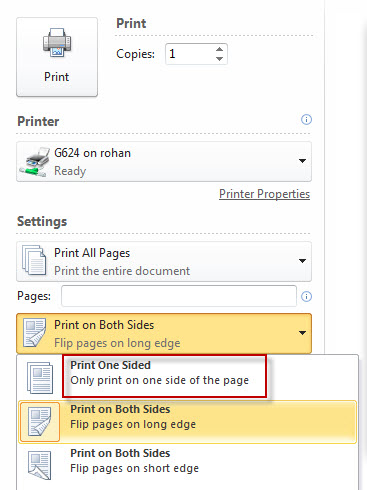
  • When printing, students can choose NetPrint printers (designated with NP) DIRECTLY and single-sided printing if desired. See image below. There is No Need to login to the NetPrint web interface and upload files. 
  • 75 page limit - split larger files into multiple print jobs.

More Information about cash printing (G624, G699, and G530; Pay cash at Circulation) :
  • Students will NOT be charged for citation, abstract, library catalog, or KIOSK printing.

  • Students will be charged for printing of full-text articles, email, assignments, web pages, etc. in the main library on the Pasco campus.

  • G624 and G699 are black & white printers ($.05 per page, defaulted to "Print on Both Sides")

  • G530 is the color printer ($.25 per page, defaulted to print Single-sided)

  • You can pick up your printings at the Circulation Desk. Let us know the number of the computer (e.g. Index 8, epicenter 16, etc.) that you printed from.

To print PowerPoint slides 2-6 slides on one side of a page, print as "Handouts".


The college encourages double-sided printing to save paper and most instructors are aware of that. However, if for some reason, you would like to print single-sided, you can change the default.

Using the NetPrint Web Interface (from your laptop or any non-library computer with an internet connection)
(G841 black & white, G866 color; every currently registered student gets $12 "free" credit for printing.)
  • NetPrint Web Interface Login
  • NetPrint Information page
  • $12 "free" credit per quarter
  • The black & white printer defaults to double-sided printing and it cannot be changed using the NetPrint web interface
  • Limited file types accepted using the NetPrint web interface. A lot of files can be converted to XPS files, which works with the NetPrint web interface. If you need help, ask a reference librarian.
  • NetPrint Demo (Update: All student NetAccounts are automatically activated now. Please skip the first part of the video.)

y.y.

Wednesday, May 4, 2011

Choose Privacy Week 2011

Choose Privacy Week May 2-8, 2010May 1-7, 2011 is the second annual Choose Privacy Week, an ongoing program by American Library Association.

Library Display:
View the list of books on display at the CBC Library.

Handouts:
Videos: 
Have you ever "googled" your name? Were you surprised by what you found online? Take some time to watch the following thought-provoking video.

Choose Privacy Week Video from 20K Films on Vimeo.

Here is another video that explores how technology has influenced our concept of privacy.


More Videos

More Websites:

What They Know. A Series of articles on digital privacy from The Wall Street Journal.

Privacy in Peril.

The Paranoid's Guide to Facebook

Please Rob Me: Raising awareness about over-sharing and locational privacy.

securepasswords.net

Annette Cary. "Protecting ID easy as A-b-C. " Tri - City Herald 5 May 2011,Washington State Newsstand, ProQuest. Web. 5 May. 2011.

updated 5/5/2011 yy

Wednesday, April 28, 2010

Choose Privacy Week

Choose Privacy Week May 2-8, 2010The American Library Association has declared May 2-8, 2010 the first 'Choose Privacy Week,' calling for "a national conversation about privacy rights in a digital age." Among the resources posted is a new video, available online May 1st:

Choose Privacy Week Trailer from 20K Films on Vimeo.


New study shows young adults value online privacy but many "believe incorrectly that the law protects their privacy online and offline more than it actually does." (p.4): Hoofnagle, Chris Jay, King, Jennifer, Li, Su and Turow, Joseph, How Different are Young Adults from Older Adults When it Comes to Information Privacy Attitudes and Policies? (April 14, 2010). Available at SSRN: http://ssrn.com/abstract=1589864

Monday, February 22, 2010

MLA Format for Research Papers in MS Word 2007


Posted to YouTube March 31, 2009. Video created by Dr. Tonya-Marie Howe, assistant professor, Literature and Languages, Marymount University. Covers formatting margins, line spacing, headers, hanging indent for works cited, and more. Audio is music-only. Some instructions are specific to her classes, such as the requirement to use a serifed font - MLA only requires "an easily readable typeface (e.g., Times New Roman)." MLA 7th, 4.2.